


Laravel tree structure using nested sets
A Laravel package for working with trees in relational databases. This package is the successor of the abandoned kalnoy/laravel-nestedset package.
What are nested sets?
Nested sets or Nested Set Model is a way to effectively store hierarchical data in a relational table by assigning two numbers to each node which span the used numbers of the child nodes. From Wikipedia:
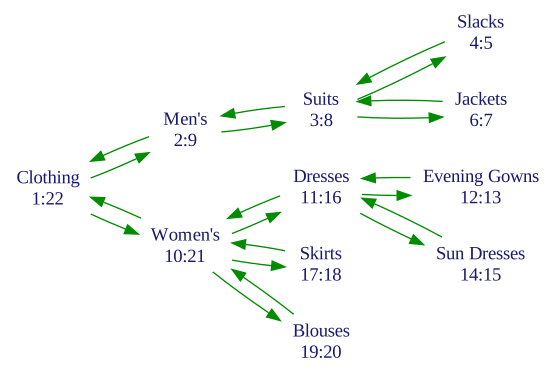
Nested Sets shows good performance when tree is updated rarely. It is tuned to be fast for getting related nodes. It’is ideally suited for building multi-depth menu or categories for shop. The data structure isn’t suited for trees that must be updated often compared to the number of reads.
Requirements
- PHP >= 8.1
- Laravel >= 10.0
- MySQL, MariaDB, PostgreSQL, SQLite, SQL Server
Installation
To install the package, execute in terminal:
composer require aimeos/laravel-nestedset
Setup
The schema
To extend your table with nested set columns in the up() method of your migration file:
// Use "id" column of type unsignedInteger
Schema::create('table', function (Blueprint $table) {
    ...
    $table->nestedSet();
    $table->nestedSetDepth();
    $table->nestedSetIndex(); // remove if you want own indexes
});

// Use custom id column and unsignedBigInteger id/parent_id columns
Schema::create('table', function (Blueprint $table) {
    ...
    $table->nestedSet('uid', 'unsignedBigInteger');
    $table->nestedSetDepth('uid');
    $table->nestedSetIndex(); // remove if you want own indexes
});

// Use UUID id/parent_id columns
Schema::create('table', function (Blueprint $table) {
    ...
    $table->nestedSet('id', 'uuid');
    $table->nestedSetDepth();
    $table->nestedSetIndex(); // remove if you want own indexes
});
To remove the nested set columns from your table in down() use:
// To drop columns
Schema::table('table', function (Blueprint $table) {
    $table->nestedSetIndex(); // only if you don't have own indexes
    $table->nestedSetDepth();
    $table->dropNestedSet();
});
The model
Your model should use Aimeos\Nestedset\NodeTrait trait to enable nested sets:
use Aimeos\Nestedset\NodeTrait;

class MyModel extends Model {
    use NodeTrait;
}
Changelog
7.x
- Changed namespace from Kalnoy to Aimeos
- UUID and configurable ID type support
- New depth column to improve performance
- Full SQL Server support
- Strict parameter and return types
- PHPUnit 11/12 support
- Several bugfixes
6.x
- Original code base of kalnoy/laravel-nestedset
Deprecations
The following methods are deprecated and will be removed in future versions:
- withDepth(): See using depth attribute instead
Migration
Migration from kalnoy/nestedset
Create a new migration to update your nested set table:
Schema::create('table', function (Blueprint $table) {
    $table->nestedSetDepth(); // update table schema
});

MyModel::fixTree(); // update tree values
Change the trait namespace:
- use Kalnoy\Nestedset\NodeTrait;
+ use Aimeos\Nestedset\NodeTrait;
Migrating from other nested set extension
If your previous extension used different set of columns, you just need to override following methods on your model class:
public function getLftName()
{
    return 'left';
}

public function getRgtName()
{
    return 'right';
}

public function getParentIdName()
{
    return 'parent';
}

// Specify parent id attribute mutator
public function setParentAttribute($value)
{
    $this->setParentIdAttribute($value);
}
Migrating from basic parent info
If your tree contains parent_id info, you need to add two columns to your schema:
$table->unsignedInteger('_lft');
$table->unsignedInteger('_rgt');
After setting up your model you only need to fix the tree to fill
_lft and _rgt columns:
MyModel::fixTree();
Usage
Suppose that we have a model MyModel and a $node variable is an instance of that model
and the node that we are manipulating. It can be a fresh model or one from database.
Tree safety
Inserting, deleting and moving nodes includes several database queries, so it is crucial to use transactions and locking to protect against corrupt data structures.
IMPORTANT: Transactions alone are not enough!
To guard against concurrent tree updates, use:
use Illuminate\Support\Facades\DB;
use Illuminate\Support\Facades\Cache;

Cache::lock('my_shared_lock_key', 30)->get( // max 30 seconds
    fn() => DB::transaction(fn() => MyModel::find($id)->appendToNode($parent)->save()
);
Relationships
Node has following relationships that are fully functional and can be eagerly loaded:
- Node belongs to
parent - Node has many
children - Node has many
ancestors - Node has many
descendants
Inserting nodes
Another important note is that structural manipulations are deferred until you
hit save on model (some methods implicitly call save and return boolean result
of the operation).
If model is successfully saved it doesn’t mean that node was moved. If your application
depends on whether the node has actually changed its position, use hasMoved method:
if ($node->save()) {
    $moved = $node->hasMoved();
}
Creating nodes
When you simply creating a node, it will be appended to the end of the tree:
MyModel::create($attributes); // Saved as root
$node = new MyModel($attributes);
$node->save(); // Saved as root
In this case the node is considered a root which means that it doesn’t have a parent.
Making a root from existing node
// #1 Implicit save
$node->saveAsRoot();

// #2 Explicit save
$node->makeRoot()->save();
The node will be appended to the end of the tree.
Appending and prepending to the specified parent
If you want to make node a child of other node, you can make it last or first child.
Note: In following examples, $parent is some existing node.
There are few ways to append a node:
// #1 Using deferred insert
$node->appendToNode($parent)->save();

// #2 Using parent node
$parent->appendNode($node);

// #3 Using parent's children relationship
$parent->children()->create($attributes);

// #5 Using node's parent relationship
$node->parent()->associate($parent)->save();

// #6 Using the parent attribute
$node->parent_id = $parent->id;
$node->save();

// #7 Using static method
MyModel::create($attributes, $parent);
And only a couple ways to prepend:
// #1
$node->prependToNode($parent)->save();

// #2
$parent->prependNode($node);
Inserting before or after specified node
You can make $node to be a neighbor of the $neighbor node using following methods:
Note: $neighbor must exists, target node can be fresh. If target node exists,
it will be moved to the new position and parent will be changed if it’s required.
# Explicit save
$node->afterNode($neighbor)->save();
$node->beforeNode($neighbor)->save();

# Implicit save
$node->insertAfterNode($neighbor);
$node->insertBeforeNode($neighbor);
Building a tree from array
When using static method create on node, it checks whether attributes contains
children key. If it does, it creates more nodes recursively.
$node = MyModel::create([
    'name' => 'Foo',

    'children' => [
        [
            'name' => 'Bar',

            'children' => [
                [ 'name' => 'Baz' ],
            ],
        ],
    ],
]);
$node->children now contains a list of created child nodes.
Rebuilding a tree from array
You can easily rebuild a tree. This is useful for mass-changing the structure of the tree.
MyModel::rebuildTree($data, $delete);
$data is an array of nodes:
$data = [
    [ 'id' => 1, 'name' => 'foo', 'children' => [ ... ] ],
    [ 'name' => 'bar' ],
];
There is an id specified for node with the name of foo which means that existing
node will be filled and saved. If node is not exists ModelNotFoundException is
thrown. Also, this node has children specified which is also an array of nodes;
they will be processed in the same manner and saved as children of node foo.
Node bar has no primary key specified, so it will be created.
$delete shows whether to delete nodes that are already exists but not present
in $data. By default, nodes aren’t deleted.
Rebuilding a subtree
You can rebuild a subtree:
MyModel::rebuildSubtree($root, $data);
This constraints tree rebuilding to descendants of $root node.
Retrieving nodes
In some cases we will use an $id variable which is an id of the target node.
Ancestors and descendants
Ancestors make a chain of parents to the node. Helpful for displaying breadcrumbs to the current category.
Descendants are all nodes in a sub tree, i.e. children of node, children of children, etc.
Both ancestors and descendants can be eagerly loaded.
// Accessing ancestors
$node->ancestors;

// Accessing descendants
$node->descendants;
It is possible to load ancestors and descendants using custom query:
$result = MyModel::ancestorsOf($id);
$result = MyModel::ancestorsAndSelf($id);
$result = MyModel::descendantsOf($id);
$result = MyModel::descendantsAndSelf($id);
In most cases, you need your ancestors to be ordered by the level:
$result = MyModel::defaultOrder()->ancestorsOf($id);
A collection of ancestors can be eagerly loaded:
$categories = MyModel::with('ancestors')->paginate(30);

// in view for breadcrumbs:
@foreach($categories as $i => $category)


@endforeach
Siblings
Siblings are nodes that have same parent.
$result = $node->getSiblings();

$result = $node->siblings()->get();
To get only next siblings:
// Get a sibling that is immediately after the node
$result = $node->getNextSibling();

// Get all siblings that are after the node
$result = $node->getNextSiblings();

// Get all siblings using a query
$result = $node->nextSiblings()->get();
To get previous siblings:
// Get a sibling that is immediately before the node
$result = $node->getPrevSibling();

// Get all siblings that are before the node
$result = $node->getPrevSiblings();

// Get all siblings using a query
$result = $node->prevSiblings()->get();
Getting related models from other table
Imagine that each model has many goods. I.e. HasMany relationship is established.
How can you get all goods of and every its descendant:
// Get IDs of descendants
$ids = $model->descendants()->pluck('id');

// Include the ID of model itself
$ids[] = $model->getKey();

// Get related goods
$goods = Goods::whereIn('mymodel_id', $ids)->get();
Using node depth
If you need to know at which level the node is:
$result = MyModel::find($id);
$depth = $result->getDepth();
Root node will be at level 0. Children of root nodes will have a level of 1, etc.
To get nodes of specified level, you can apply where constraint:
$result = MyModel::where('depth', '=', 1)->get();
Default order
All nodes are strictly organized internally. By default, no order is applied, so nodes may appear in random order and this doesn’t affect displaying a tree. You can order nodes by alphabet or other index.
But in some cases hierarchical order is essential. It is required for retrieving ancestors and can be used to order menu items.
To apply tree order defaultOrder method is used:
$result = MyModel::defaultOrder()->get();
You can get nodes in reversed order:
$result = MyModel::reversed()->get();
To shift node up or down inside parent to affect default order:
$bool = $node->down();
$bool = $node->up();

// Shift node by 3 siblings
$bool = $node->down(3);
The result of the operation is boolean value of whether the node has changed its position.
Constraints
Various constraints that can be applied to the query builder:
- whereIsRoot() to get only root nodes
- hasParent() to get non-root nodes
- whereIsLeaf() to get only leaves
- hasChildren() to get non-leave nodes
Note: Leaf detection is based on the nested set bounds (
_lft/_rgt). Soft-deleting a child does not close the gap in the tree (so it can be restored to its original position), so a node whose children are all soft-deleted is still not reported as a leaf. Hard-deleting the children closes the gap and the node becomes a leaf as expected.
- whereIsAfter($id) to get every node (not just siblings) that are after a node with specified id
- whereIsBefore($id) to get every node that is before a node with specified id
Descendants constraints:
$result = MyModel::whereDescendantOf($node)->get();
$result = MyModel::whereNotDescendantOf($node)->get();
$result = MyModel::orWhereDescendantOf($node)->get();
$result = MyModel::orWhereNotDescendantOf($node)->get();
$result = MyModel::whereDescendantAndSelf($id)->get();

// Include target node into result set
$result = MyModel::whereDescendantOrSelf($node)->get();
Ancestor constraints:
$result = MyModel::whereAncestorOf($node)->get();
$result = MyModel::whereAncestorOrSelf($id)->get();
$node can be either a primary key of the model or model instance.
Building a tree
After getting a set of nodes, you can convert it to tree. For example:
$tree = MyModel::get()->toTree();
This will fill parent and children relationships on every node in the set and
you can render a tree using recursive algorithm:
$nodes = MyModel::get()->toTree();

$traverse = function ($categories, $prefix = '-') use (&$traverse) {
    foreach ($categories as $category) {
        echo PHP_EOL.$prefix.' '.$category->name;

        $traverse($category->children, $prefix.'-');
    }
};

$traverse($nodes);
This will output something like this:
- Root
-- Child 1
--- Sub child 1
-- Child 2
- Another root
Building flat tree
Also, you can build a flat tree: a list of nodes where child nodes are immediately after parent node. This is helpful when you get nodes with custom order (i.e. alphabetically) and don’t want to use recursion to iterate over your nodes.
$nodes = MyModel::get()->toFlatTree();
Previous example will output:
Root
Child 1
Sub child 1
Child 2
Another root
Getting a subtree
Sometimes you don’t need whole tree to be loaded and just some subtree of specific node. It is show in following example:
$root = MyModel::descendantsAndSelf($rootId)->toTree()->first();
In a single query we are getting a root of a subtree and all of its
descendants that are accessible via children relation.
If you don’t need $root node itself, do following instead:
$tree = MyModel::descendantsOf($rootId)->toTree($rootId);
Deleting nodes
To delete a node:
$node->delete();
IMPORTANT: Any descendant that node has will also be deleted!
To delete multiple nodes:
$nodes = Model::query()->get();
foreach ($nodes as $node) {
    $node->fresh()?->delete(); // Reload the `_lft` & `_rgt` columns using `fresh()` method
}
IMPORTANT: Nodes are required to be deleted as models, don’t try do delete them using a query like so:
MyModel::where('id', '=', $id)->delete();
This will break the tree!
SoftDeletes trait is supported, also on model level.
Hint: Optimizing deletion
By default, when a node is deleted, each descendant is loaded and deleted individually
so that Eloquent model events (e.g. deleting, deleted) are fired for every
descendant. If you don’t rely on these events for descendants and want faster
deletion via a single query, override the shouldFireDescendantEvents method
in your model:
use Aimeos\Nestedset\NodeTrait;

class MyModel extends Model {
    use NodeTrait;

    protected function shouldFireDescendantEvents(): bool
    {
        return false;
    }
}
Helper methods
To check if node is a descendant of other node:
$bool = $node->isDescendantOf($parent);
To check whether the node is a root:
$bool = $node->isRoot();
Other checks:
$node->isChildOf($other);$node->isAncestorOf($other);$node->isSiblingOf($other);$node->isLeaf()(see the note under Constraints for soft-delete behavior)
Checking consistency
You can check whether a tree is broken (i.e. has some structural errors):
$bool = MyModel::isBroken();
It is possible to get error statistics:
$data = MyModel::countErrors();
It will return an array with following keys:
oddness: The number of nodes that have wrong set oflftandrgtvaluesduplicates: The number of nodes that have samelftorrgtvalueswrong_parent: The number of nodes that have invalidparent_idvalue that doesn’t correspond tolftandrgtvaluesmissing_parent: The number of nodes that haveparent_idpointing to node that doesn’t exists
A tree can be fixed using inheritance info from parent_id column,
proper _lft and _rgt values are set for every node.
Node::fixTree();
Scoping
Imagine you have Menu model and MenuItems. There is a one-to-many relationship
set up between these models. MenuItem has menu_id attribute for joining models
together. MenuItem incorporates nested sets. It is obvious that you would want to
process each tree separately based on menu_id attribute. In order to do so, you
need to specify this attribute as scope attribute:
protected function getScopeAttributes()
{
    return [ 'menu_id' ];
}
But now, in order to execute some custom query, you need to provide attributes that are used for scoping:
MenuItem::scoped([ 'menu_id' => 5 ])->get(); // OK
MenuItem::descendantsOf($id)->get(); // WRONG: returns nodes from other scope
MenuItem::scoped([ 'menu_id' => 5 ])->fixTree(); // OK
When requesting nodes using model instance, scopes applied automatically based on the attributes of that model:
$node = MenuItem::findOrFail($id);
$node->siblings()->get(); // OK
To get scoped query builder using instance:
$node->newScopedQuery();
Always use scoped query when eager loading:
MenuItem::scoped([ 'menu_id' => 5])->with('descendants')->findOrFail($id); // OK
MenuItem::with('descendants')->findOrFail($id); // WRONG
License
Copyright (c) 2013-2025 Alexander Kalnoy, (c) 2026 Aimeos and contributors
Permission is hereby granted, free of charge, to any person obtaining a copy of this software and associated documentation files (the “Software”), to deal in the Software without restriction, including without limitation the rights to use, copy, modify, merge, publish, distribute, sublicense, and/or sell copies of the Software, and to permit persons to whom the Software is furnished to do so, subject to the following conditions:
The above copyright notice and this permission notice shall be included in all copies or substantial portions of the Software.
THE SOFTWARE IS PROVIDED “AS IS”, WITHOUT WARRANTY OF ANY KIND, EXPRESS OR IMPLIED, INCLUDING BUT NOT LIMITED TO THE WARRANTIES OF MERCHANTABILITY, FITNESS FOR A PARTICULAR PURPOSE AND NONINFRINGEMENT. IN NO EVENT SHALL THE AUTHORS OR COPYRIGHT HOLDERS BE LIABLE FOR ANY CLAIM, DAMAGES OR OTHER LIABILITY, WHETHER IN AN ACTION OF CONTRACT, TORT OR OTHERWISE, ARISING FROM, OUT OF OR IN CONNECTION WITH THE SOFTWARE OR THE USE OR OTHER DEALINGS IN THE SOFTWARE.